For civil litigators

Know what needs your attention and what comes next.

See your matters, next actions, deadlines, and appearances in one place. Keep your dates and action items current, and Handled. helps you see where to focus.

Free forever  ·  Mac and Windows  ·  Your case information stays private
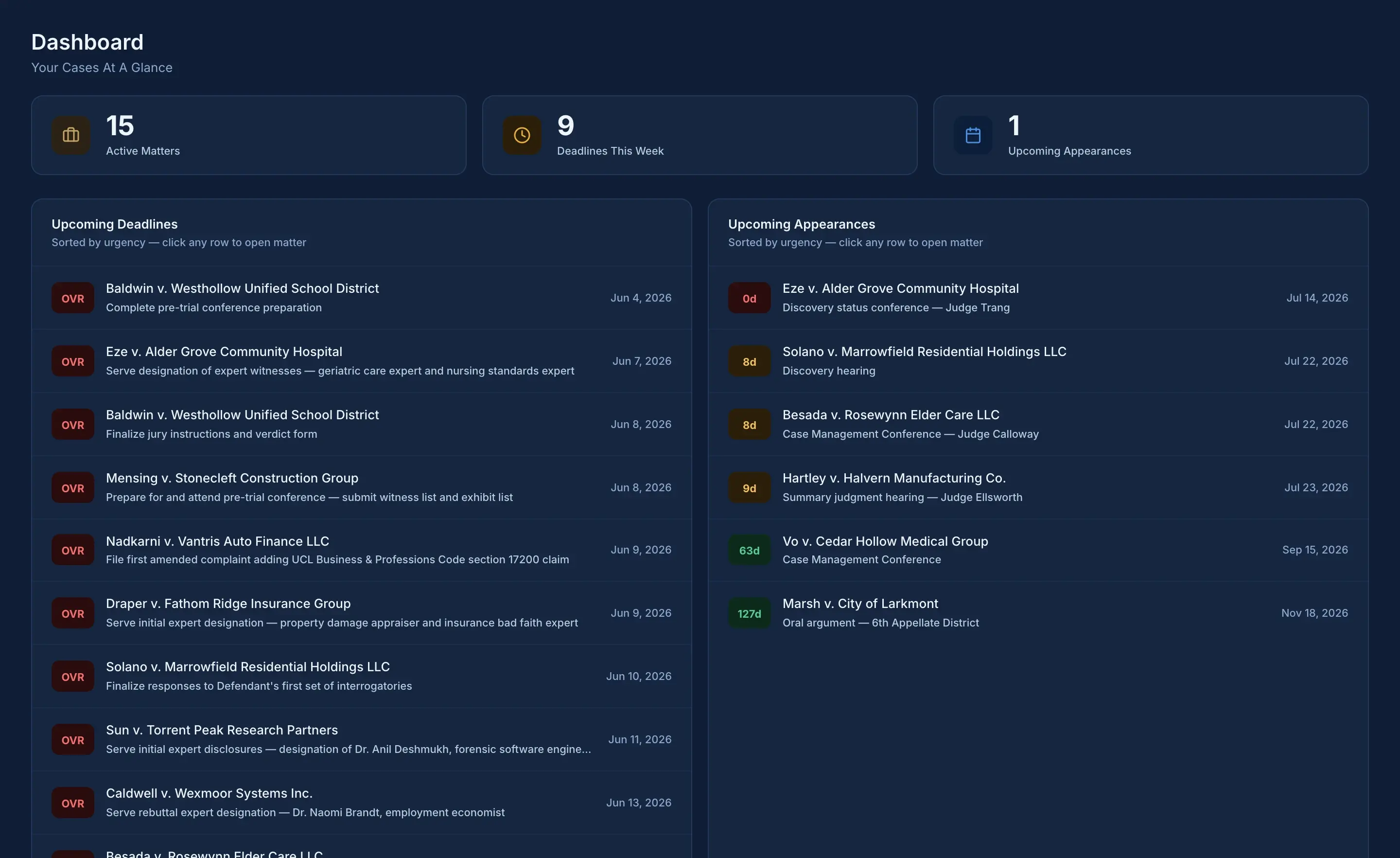
Handled. dashboard: active matters with urgency-ranked deadlines and appearances across your caseload
The dashboard: your caseload at a glance, ranked by urgency  ·  Solo and up
All case names and data shown are fabricated for demonstration

Built by a practicing civil litigatorWorks even without an internet connectionPro lets you work with an assistant or paralegal

Why Handled. exists

Your current software was built for every kind of lawyer. Which means it was built for none.

Handled. maps to how litigation actually moves: statuses, key dates, parties with counsel, appearances, negotiations. Nothing you don't need. Nothing you'd have to configure around.

01 · Deadlines

One glance.
Whole caseload.

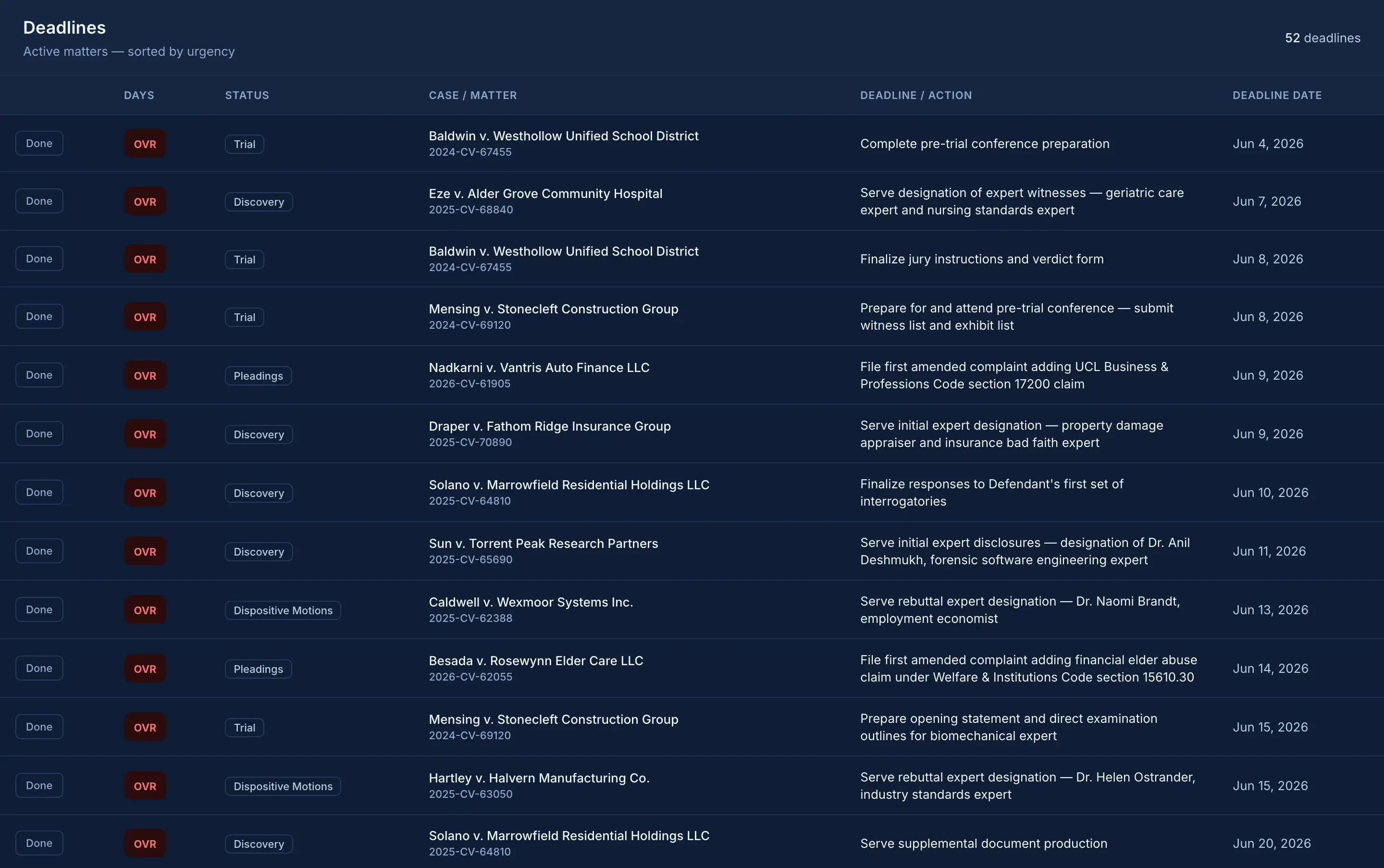
Every deadline across every matter, ranked by urgency, each with a live countdown. What needs you today rises to the top before it becomes a problem.

Deadlines view: active matters sorted by urgency with countdown chips
Deadlines: sorted by urgency across all matters  ·  Solo and up
02 · The matter file

The whole case,
on one page.

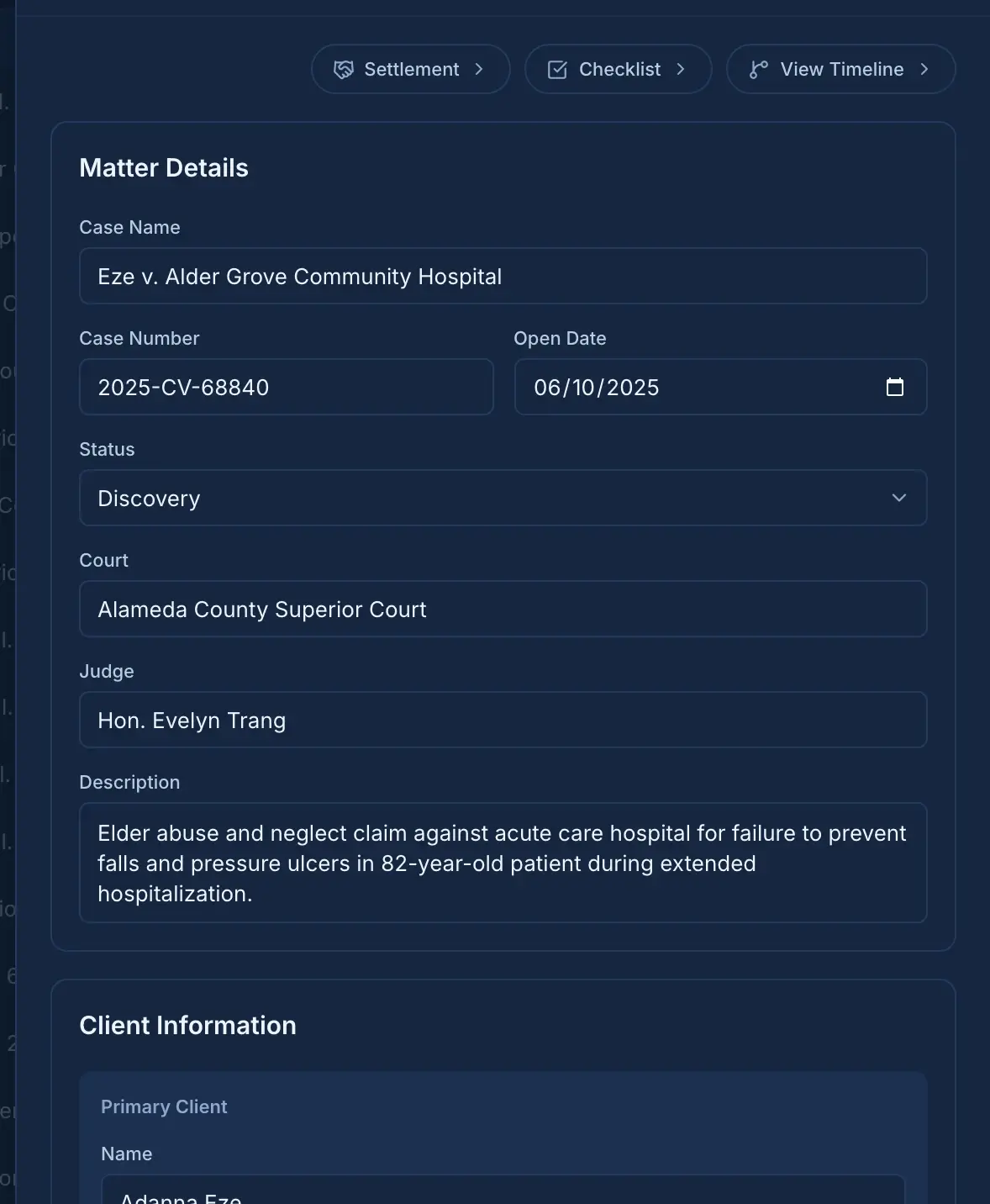
Parties and counsel, key dates, court and department, client details, notes. The file you'd assemble by hand, kept together from intake through resolution.

Matter detail: case name, status, court, client, parties, and counsel in one view
Matter detail: everything about the case, in one place  ·  All tiers, including Free
03 · The timeline

See the arc
of every case.

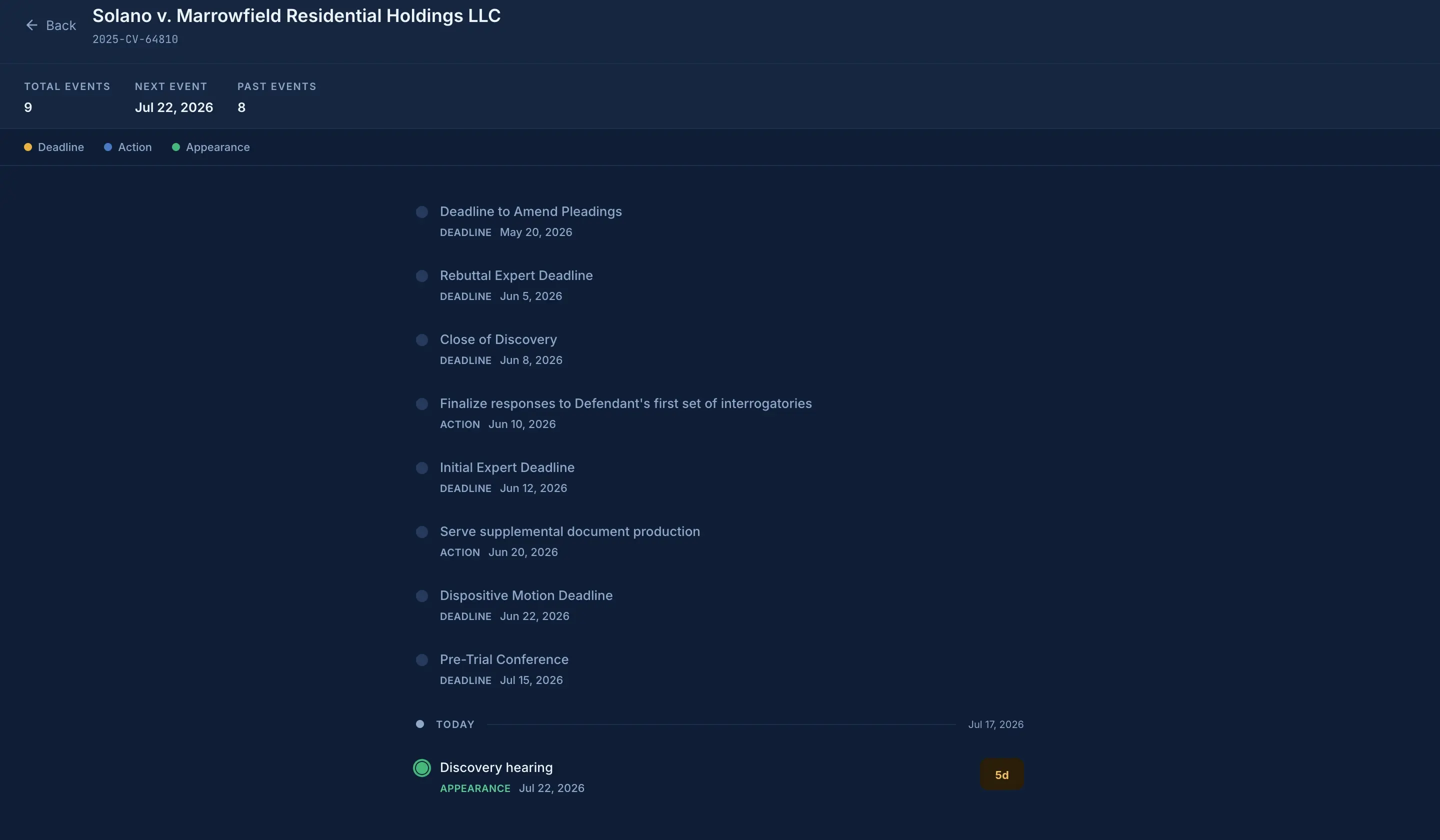
Every deadline, action, and appearance on a single chronological line: what's behind you, what's today, and what's coming. The whole story of the matter at a glance.

Per-matter timeline: deadlines, actions, and appearances in chronological order
Matter timeline: past, present, and what's next  ·  Pro
What it replaces

Sticky notes, spreadsheets,
and sheer memory.

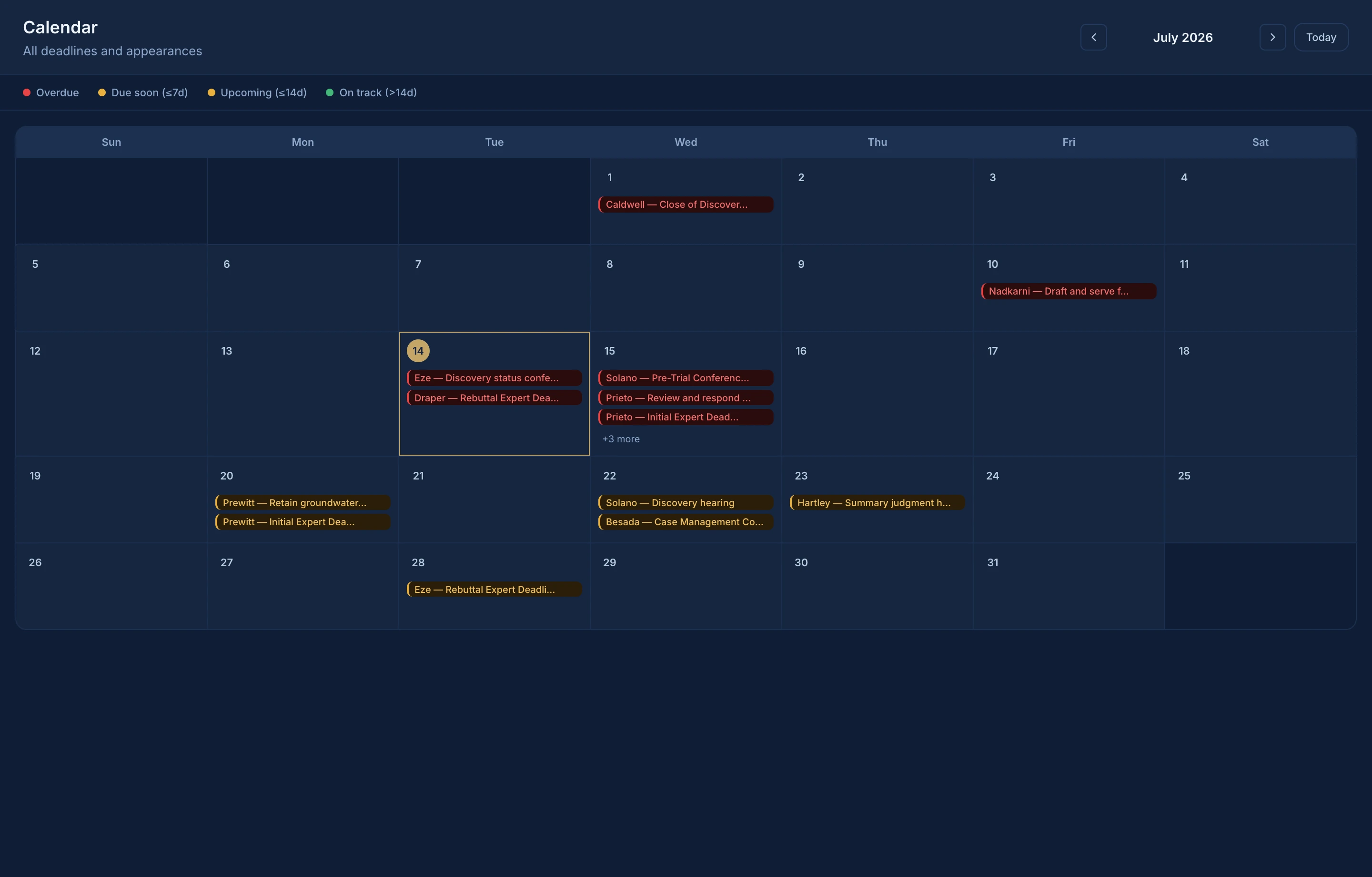
Calendar · Pro
Every date, one calendar

Deadlines and appearances across every matter, color-coded by urgency.

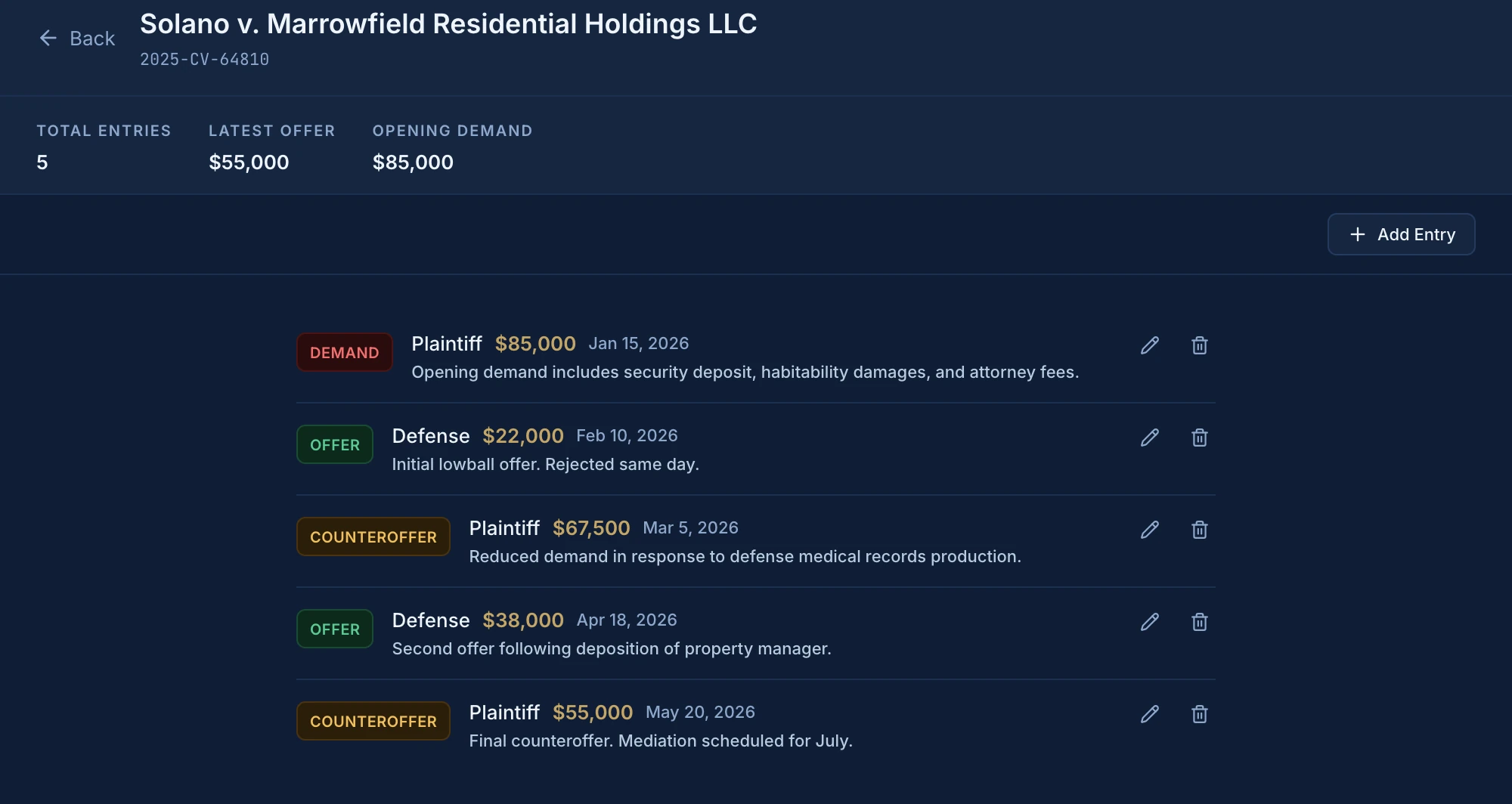
Negotiations · Pro
Every offer, logged

Demands, offers, and counters live in the matter, not a spreadsheet.

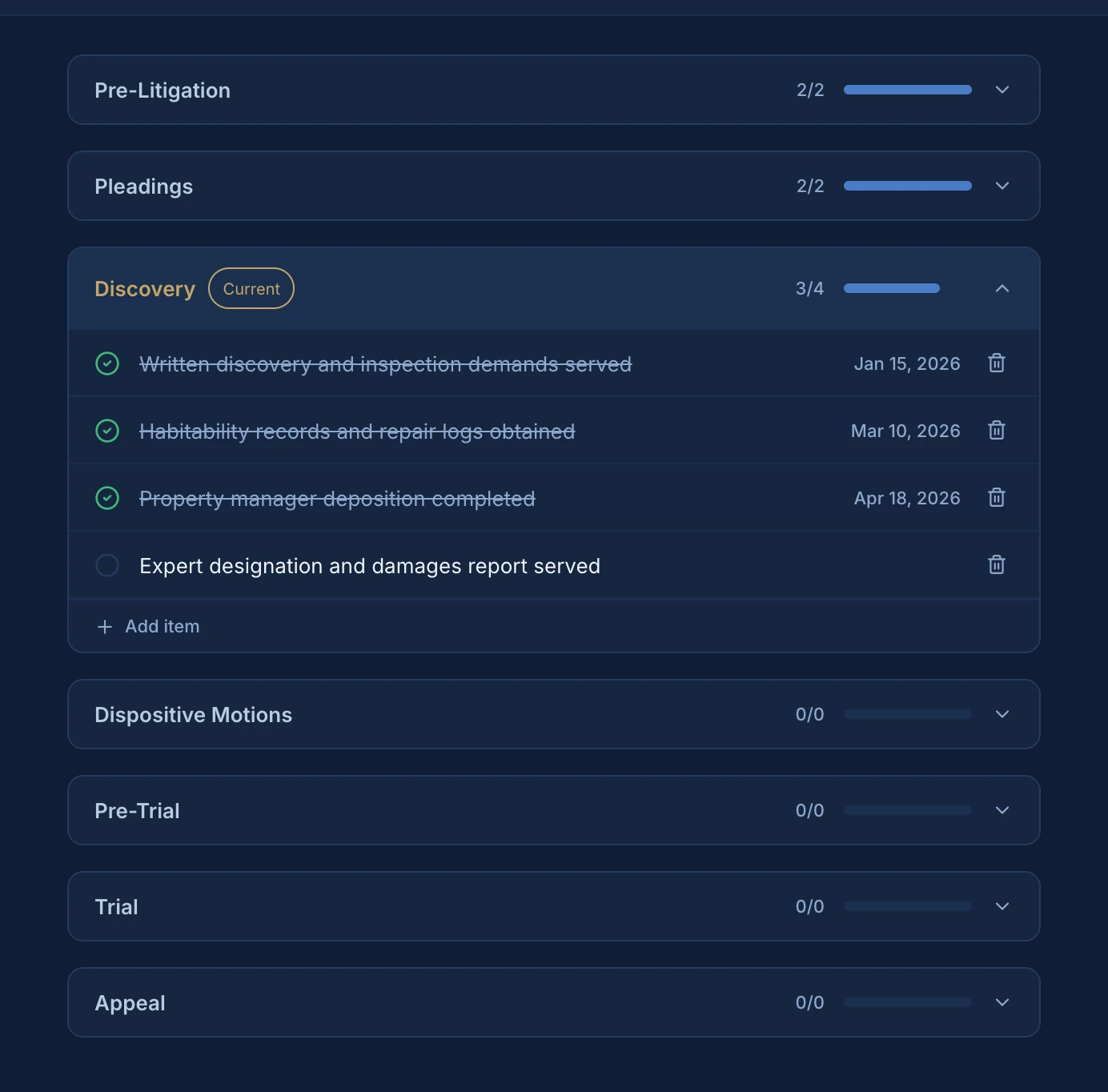
Stages · Pro
Checklists that follow the case

Stage-by-stage checklists so nothing gets skipped on the way to trial.

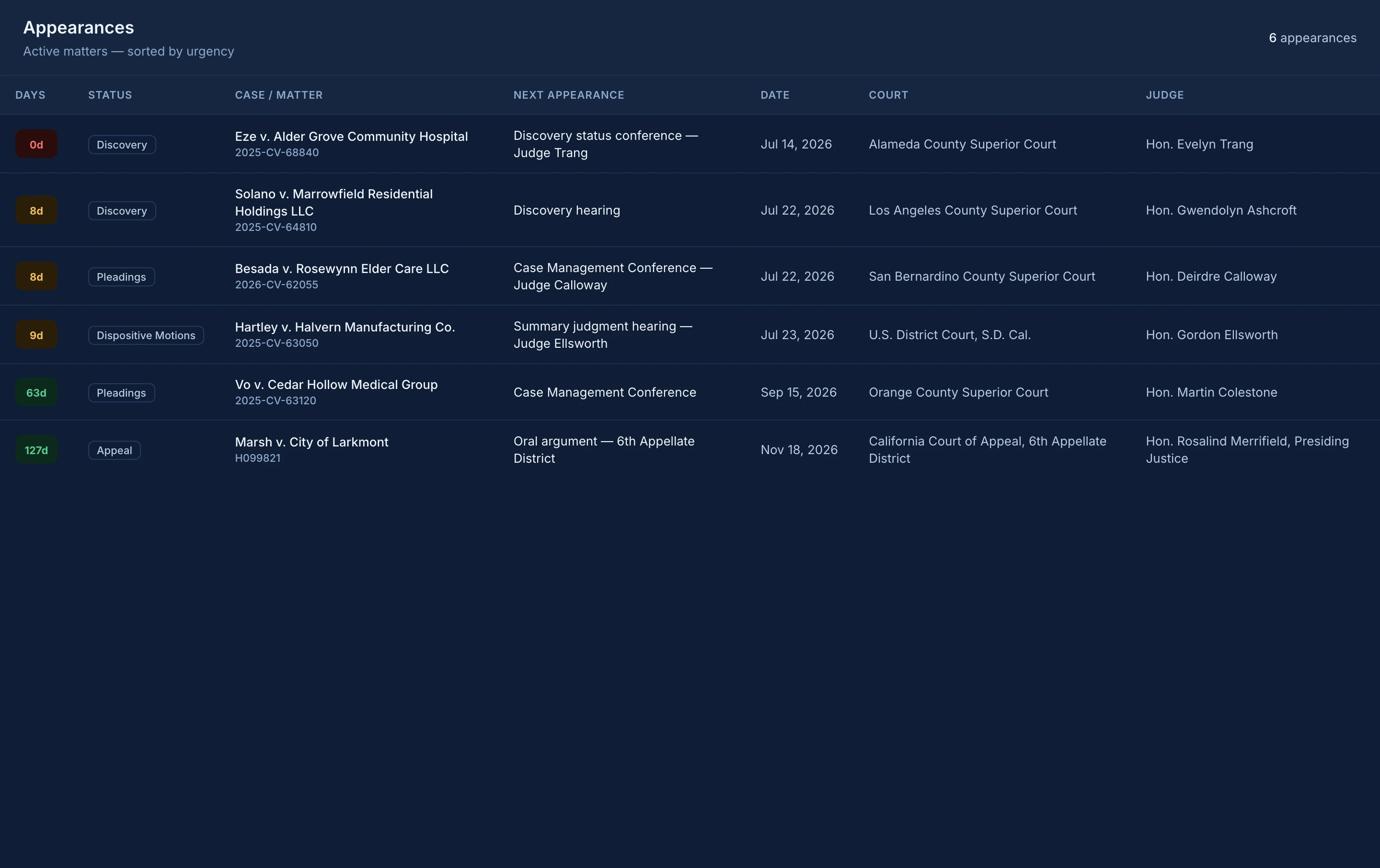
Appearances · Solo and up
Never walk in cold

Every hearing and conference, with matter context one click away.

The life of a matter

Handled. follows the case
from intake to resolution.

Intake
Day 0
Pleadings
Day 21
Discovery
You are here
Motions
Day 240
Trial
Day 390
Resolution
Closed
Available with Pro

One case. One current version.

You and your assistant or paralegal work from the same matters, deadlines, notes, appearances, and next steps. When either of you makes a change, Handled. keeps the other person current, without emailing spreadsheets, forwarding notes, or wondering who has the latest version.

·  Invite one assistant or paralegal
·  See each other's updates
·  Work from separate computers
·  Remove their access when needed
·  Keep working if the internet goes out

Your case information is private.

With Free and Solo, it stays on that computer. Pro adds a protected, end-to-end encrypted copy so you and an authorized assistant or paralegal can work from the same information. Handled. cannot open or read your case files.

End-to-end encrypted: meaning Handled. cannot read what you store.

Learn more about how Handled. protects your work →
Getting started

Get your First 10 in.

Start with a short walkthrough. Then add ten active matters, record the next action and its date for each, and see where your attention is needed.

  1. 01
    Add or import 10 active matters.
    Solo and Pro can import matters, next actions, and dates from a CSV.
  2. 02
    Record a current next action and date for each.
    Handled. shows what you record. It does not decide what a case requires.
  3. 03
    Open the dashboard and deadlines.
    See which matters need attention first, ranked by date.
Free, Solo, and Pro

Start with the plan
that fits how you work.

Free keeps the basics organized. Solo shows one attorney what needs attention. Pro adds one invited assistant or paralegal.

Free
Coming soon

Keep your matters organized.

For one attorney organizing matters and core case information.

$0

per month, with no time limit

  • Full matter files
  • Parties, counsel, key dates, and notes
  • A next action and a next appearance on each matter
  • Case information stays on your computer
  • Backup and restore whenever you choose
Solo
Coming soon

Your caseload, at a glance.

For one attorney, including an attorney who works at a firm.

$19

per month founding, or $190 per year

Standard: $29 per month or $313 per year.

  • Everything in Free
  • Multiple next actions and appearances on each matter
  • Urgency-ranked dashboard
  • Countdown on every deadline
  • Appearances across your caseload
  • CSV import of matters, next actions, and dates
Pro
Coming soon

You and your assistant, working together.

For one attorney working with one invited assistant or paralegal.

$39

per month founding, or $390 per year

Standard: $59 per month or $637 per year.

  • Everything in Solo
  • Invite one assistant or paralegal
  • Keep matters and updates current between you
  • Work from separate authorized computers
  • Unified calendar, negotiations, checklists, and timelines

Founding pricing is limited to the first 25 paid accounts. Joining the launch list does not reserve a place. A place is claimed only after a successful paid Solo or Pro purchase. Founding pricing continues while the account remains continuously subscribed to Solo or Pro. Cancellation, a move to Free, completed nonpayment, or a guarantee refund ends founding status.

Get notified when Handled. launches.

Choose a plan above or enter your email and decide later.

Plan interest: Not sure yet

We'll use your email to send Handled. launch updates.

By signing up, you agree to receive launch emails from Handled. See our Privacy Policy.

Risk reversal

30-Day Clarity Guarantee

Try Handled. for 30 days. Get your First 10 in: import or create at least 10 active matters and add a current next action to each. If Handled. does not give you a clearer, faster way to see what needs attention and what comes next, email [email protected] within 30 calendar days of your first payment for a full refund of that initial payment. You never need to send us case information or screenshots.

Questions attorneys ask

Straight answers.

Where does my case information live?

Free and Solo keep it on your computer. Pro keeps a protected copy so you and an assistant or paralegal can work from the same information. Handled. cannot open or read it.

What does Solo mean?

Solo is the plan for one attorney. It describes how many people use the account, not how you practice, so an attorney at a firm can use Solo too. If you want an assistant or paralegal working from the same case information, that is Pro.

How does Pro work with my assistant or paralegal?

You invite one person you trust. They sign in from their own computer and work from the same matters, deadlines, notes, and updates. You can remove their access from your account.

What happens if the internet goes out?

You can keep working. Handled. saves your changes on your computer and Pro updates the other authorized computer after you reconnect.

What if my computer is lost or stops working?

Free and Solo users can restore a backup created from the app. Pro users can also recover protected case information through the account's recovery process. Keep your recovery information somewhere safe. Handled. cannot recreate it for you.

Is Free actually free?

Yes. Free is a permanent plan, not a trial. There is no time limit, credit card, or automatic conversion to a paid plan.

Can I import my current caseload?

Solo and Pro can import a CSV of basic matter information, including each matter's next action and its date. The import does not create a complete working caseload. You still need to add and keep current each matter's deadlines, appearances, and other details.

What happens to my information if I downgrade or cancel?

Nothing on your computer is deleted. If your new plan allows fewer next actions or appearances on a matter, the extra items stay visible as read-only until you upgrade or trim them. Leaving Pro stops syncing and ends your assistant's access, and the protected online copy is deleted within 30 days. The copy on your computer stays.

What is the 30-Day Clarity Guarantee?

Try Handled. for 30 days. Get your First 10 in: import or create at least 10 active matters and add a current next action to each. If Handled. does not give you a clearer, faster way to see what needs attention and what comes next, email [email protected] within 30 calendar days of your first payment for a full refund of that initial payment. You never need to send us case information or screenshots.

Does joining the launch list reserve founding pricing?

Founding pricing is limited to the first 25 paid accounts. Joining the launch list does not reserve a place. A place is claimed only after a successful paid Solo or Pro purchase. Founding pricing continues while the account remains continuously subscribed to Solo or Pro. Cancellation, a move to Free, completed nonpayment, or a guarantee refund ends founding status.

Can support help without seeing my case information?

We can help without seeing your case information. Please do not send client or case details, documents, spreadsheets, backups, database files, recovery phrases, or screenshots containing confidential information. Describe the issue using a fictional example.
Rest easy.
It's handled.

Choose a plan and get notified when sign-ups open. Your practice data stays under your control.